Bounding Box Tools
The bounding module provides tools related to operating on hou.BoundingBox objects.
add_to_bounding_box_max
The add_to_bounding_box_max() function will add the supplied hou.Vector3 value to the
hou.BoundingBox.maxvec() values.
>>> bbox = hou.BoundingBox(-0.5, -0.5, -0.5, 0.5, 0.5, 0.5)
>>> bounding.add_to_bounding_box_max(bbox, hou.Vector3(0.5, 0.5, 0.5))
>>> bbox
<hou.BoundingBox [-0.5, 1, -0.5, 1, -0.5, 1]>
add_to_bounding_box_min
The add_to_bounding_box_min() function will add the supplied hou.Vector3 value to the
hou.BoundingBox.minvec() values.
>>> bbox = hou.BoundingBox(-0.5, -0.5, -0.5, 0.5, 0.5, 0.5)
>>> bounding.add_to_bounding_box_min(bbox, hou.Vector3(0.5, 0.5, 0.5))
>>> bbox
<hou.BoundingBox [0, 0.5, 0, 0.5, 0, 0.5]>
>>> bounding.add_to_bounding_box_min(bbox, hou.Vector3(-1, -1, -1))
>>> bbox
<hou.BoundingBox [-1, 0.5, -1, 0.5, -1, 0.5]>
bounding_box_area
The bounding_box_area() function returns the area of the hou.BoundingBox surface.
>>> bbox = hou.BoundingBox(-0.5, -0.5, -0.5, 0.5, 0.5, 0.5)
>>> bounding.bounding_box_area(bbox)
6.0
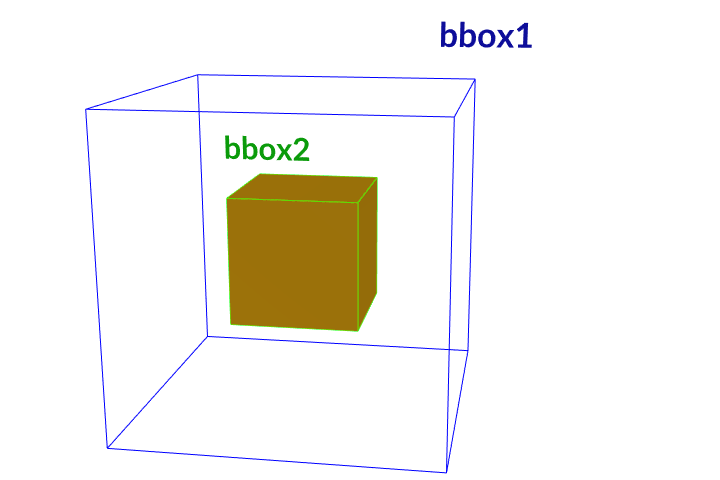
bounding_box_is_inside
The bounding_box_is_inside() function will checks whether a hou.BoundingBox is completely enclosed by
another hou.BoundingBox.

>>> bbox1 = hou.BoundingBox(-0.5, -0.5, -0.5, 0.5, 0.5, 0.5)
>>> bbox2 = hou.BoundingBox(-0.2, -0.2, -0.2, 0.2, 0.2, 0.2)
>>> bbox3 = hou.BoundingBox(0.3, -0.2, -0.2, 1.1, 0.2, 0.2)
# A box cannot completely enclose itself.
>>> bounding.bounding_box_is_inside(bbox1, bbox1)
False
>>> bounding.bounding_box_is_inside(bbox2, bbox1)
True
# Reversed the parameter order
>>> bounding.bounding_box_is_inside(bbox1, bbox2)
False
>>> bounding.bounding_box_is_inside(bbox3, bbox1)
False
bounding_box_volume
The bounding_box_volume() function returns the volume of the hou.BoundingBox surface.
>>> bbox = hou.BoundingBox(-0.5, -0.5, -0.5, 0.5, 0.5, 0.5)
>>> bounding.bounding_box_volume(bbox)
1.0
bounding_boxes_intersect
The bounding_boxes_intersect() function will checks whether a hou.BoundingBox is intersects another
hou.BoundingBox.
>>> bbox1 = hou.BoundingBox(-0.5, -0.5, -0.5, 0.5, 0.5, 0.5)
>>> bbox2 = hou.BoundingBox(-0.2, -0.2, -0.2, 0.2, 0.2, 0.2)
>>> bbox3 = hou.BoundingBox(0.3, -0.2, -0.2, 1.1, 0.2, 0.2)
>>> bounding.bounding_boxes_intersect(bbox1, bbox2)
True
>>> bounding.bounding_boxes_intersect(bbox1, bbox3)
True
>>> bounding.bounding_boxes_intersect(bbox2, bbox3)
False
compute_bounding_box_intersection
The compute_bounding_box_intersection() function will compute the intersection of two hou.BoundingBox
objects.
>>> bbox1 = hou.BoundingBox(-0.5, -0.5, -0.5, 0.5, 0.5, 0.5)
>>> bbox2 = hou.BoundingBox(-0.2, -0.2, -0.2, 0.2, 0.2, 0.2)
>>> bbox3 = hou.BoundingBox(0.3, -0.2, -0.2, 1.1, 0.2, 0.2)
# Boxes 2 and 3 do not intersect, so the result is None.
>>> bounding.compute_bounding_box_intersection(bbox2, bbox3) == None
True
# Box 2 is completely enclosed by Box 1, so the intersection box is Box 2.
>>> bounding.compute_bounding_box_intersection(bbox1, bbox2)
<hou.BoundingBox [-0.2, 0.2, -0.2, 0.2, -0.2, 0.2]>
>>> bounding.compute_bounding_box_intersection(bbox1, bbox2) == bbox2
True
>>> bbox1 = hou.BoundingBox(-0.5, -0.5, -0.5, 0.5, 0.5, 0.5)
>>> bbox3 = hou.BoundingBox(0.3, -0.2, -0.2, 1.1, 0.2, 0.2)
>>> bounding.compute_bounding_box_intersection(bbox1, bbox3)
<hou.BoundingBox [0.3, 0.5, -0.2, 0.2, -0.2, 0.2]>

expand_bounding_box
The expand_bounding_box() function the min and max bounds in each direction by the axis delta.